1. Introduction: The Reality of Open Models
Gemma 4 is here. It is natively multimodal, capable of processing audio, vision, and text, and crucially, it is released under an Apache 2.0 license.
As Nathan Lambert recently highlighted on Interconnects.ai regarding the factors that determine an open model's success, benchmark scores alone are insufficient. A model's true impact is defined by its tractability—whether developers can run it locally—and its fine-tunability—how easily it can be adapted to specific domains. Google's shift to a standard open license removes legal friction, but a significant technical hurdle remains: the "Day 1 Tooling Gap."
When cutting-edge architectures like Gemma 4's Conformer audio encoder launch, standard deployment tools in the C++ ecosystem, such as llama.cpp or vLLM, often lack immediate support. This leaves developers with open weights they cannot practically run or modify outside of heavy, complex PyTorch environments.
To address this exact friction, I built gemmmma and the mlxtune pipeline. This local-first, Apple Silicon-optimized toolkit bypasses the C++ ecosystem lag, providing a direct path to fine-tune multimodal models natively on a Mac.
2. What is mlxtune?
mlxtune is a seamless MLOps pipeline built entirely on Apple's mlx and mlx-vlm frameworks. It is designed to get new architectures running and training immediately, without waiting for upstream support in generalized inference engines.
The command-line interface structures the fine-tuning lifecycle into seven distinct steps:
download: Retrieve the base model and tokenizer.prep: Process modern Interleaved ChatML datasets.train: Execute LoRA adapter training.eval: Run on-the-fly testing against validation data.fuse: Bake the trained adapters back into the base model weights.gguf: Export the final model for production deployment.clean: Maintain MLOps hygiene by clearing temporary artifacts.
3. The Multimodal Leap: Training Gemma 4 to "Hear"
Fine-tuning for audio requires a significant shift from processing flat JSON text datasets (like Alpaca) to handling interleaved audio and text data. Managing the memory overhead and tensor routing for raw audio waveforms is notoriously difficult.
mlxtune abstracts this complexity. The pipeline intercepts the PyTorch weights, processes the STFT/Mel-spectrograms natively via MLX, and routes the tensors through the Conformer blocks directly on the Mac GPU.
The command-line interface makes audio fine-tuning as straightforward as text training:
uv run mlxtune prep --dataset "PolyAI/minds14" \
    --dataset-config "en-US" \
    --dest ./data_audio \
    --samples 100

uv run mlxtune train --model ~/gemma/mlx-gemma-4-e2b \
    --data ./data_audio \
    --batch-size 1 \
    --iters 40 \
    --multimodal

# Immediate on-the-fly evaluation using the injected adapters
uv run mlxtune eval --model ~/gemma/mlx-gemma-4-e2b \
    --adapter ./adapters \
    --prompt "Listen to this and transcribe it." \
    --multimodal
Once adapters are fused back into the base weights, developers can execute the complete model natively on the GPU using Apple's mlx-vlm Python bindings, bypassing inference engine compatibility issues entirely:
uv run scripts/ask_audio.py test.wav \
    --prompt "Describe the speaker's tone." \
    --model ./fused_gemma_4_audio
4. Visualizing the Learning: Enter MLXMonitor
Training locally in a terminal often feels like operating a black box. Tracking memory spikes or identifying out-of-memory (OOM) crashes caused by large audio tensors requires persistent monitoring.
To solve this, I developed MLXMonitor, a native macOS Swift application. During training, mlxtune emits a structured training_log.jsonl file. MLXMonitor reads this file in real-time, providing a live dashboard of the training run.
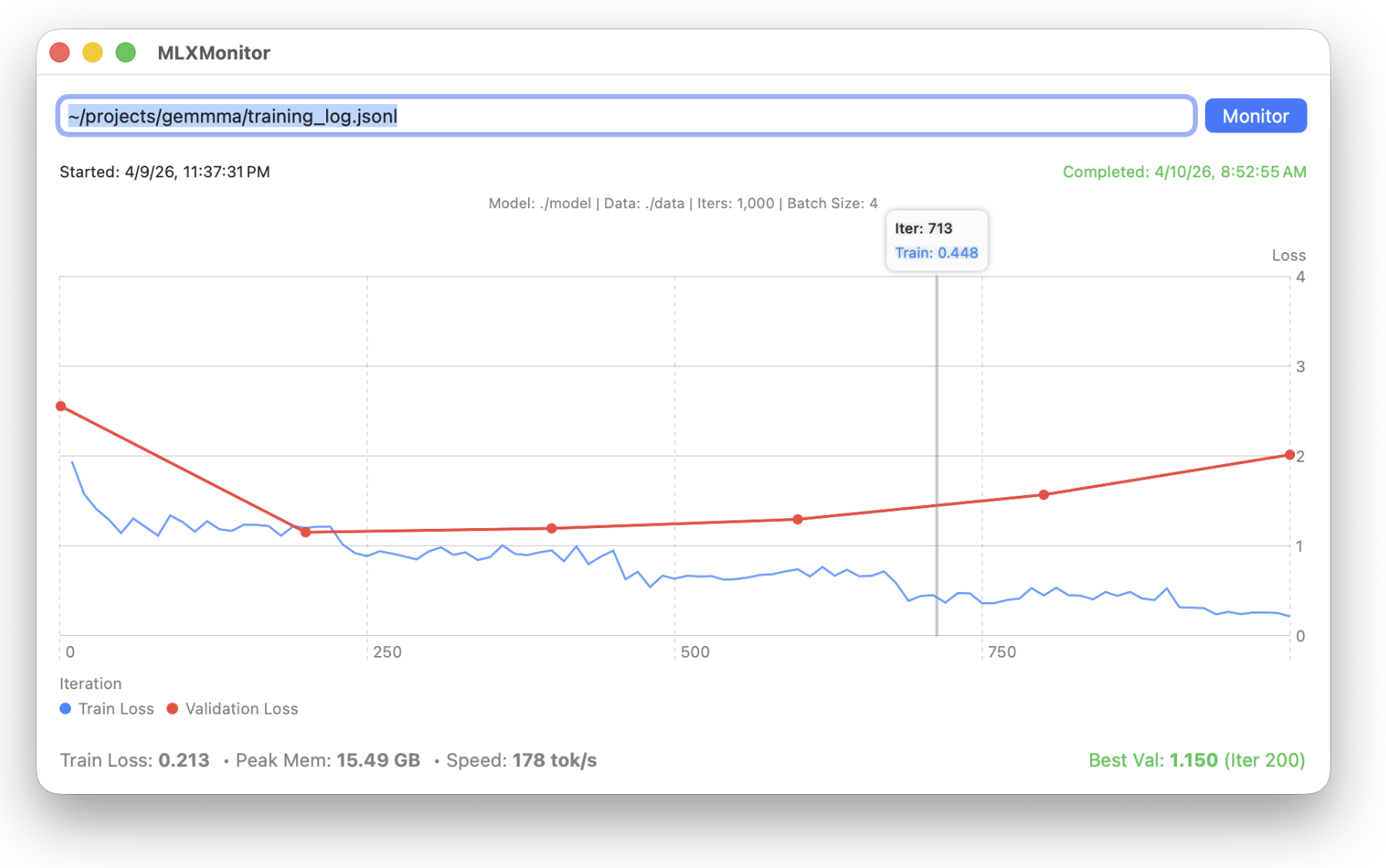
This visual feedback is critical when moving from text to audio. While a standard text-based Alpaca run displays a smooth, predictable memory usage curve, processing raw audio waveforms results in massive, jagged memory spikes. MLXMonitor makes these hardware realities visible and manageable.
5. Native Swift Inference Validation: MLXAudioUI
While Python scripts enable immediate verification, deploying local models within the Apple ecosystem necessitates compilation into Swift via MLXNN. To validate that our multimodal LoRA weights can transcend Python, we built MLXAudioUI, a native macOS SwiftUI application.
By linking against community ports of the Gemma4AudioFeatureExtractor and Conformer blocks, MLXAudioUI natively processes raw .wav inputs on the GPU. It successfully applies MLX Fast Fourier Transforms (FFT) to convert audio into 128-bin Mel-spectrograms and mathematically decodes them into the 1,024-dimension acoustic embeddings required by Gemma 4's language model. This process completely circumvents Python dependencies and demonstrates a viable path toward native iOS deployment once the broader mlx-swift repository merges the omni-model wrapper classes.
6. From Sandbox to Production: Fusing and GGUF
Training the model is only the first phase; deploying it is the ultimate goal. mlxtune provides a structured path from the training sandbox to production-ready binaries.
The custom mlxtune fuse script mathematically multiplies the trained LoRA adapters into the base linear weights, dequantizing them if necessary. Once fused, mlxtune gguf packages the newly baked model, the tokenizer, and the chat templates into a single binary file.
Currently, the broader ecosystem is still working to fully map the Gemma 4 audio projector within tools like llama.cpp. However, by completing the fusing and GGUF export steps now, your custom, fine-tuned model is fully prepared. The moment the C++ ecosystem merges support, the binary is ready to drop into a llama-server or a Go application without any additional processing.
7. The Roadmap: Where We Are Going
The initial release of mlxtune establishes the core training and export pipeline. The immediate roadmap focuses on expanding evaluation and native integration:
- Evaluation Harness: Upgrading the
mlxtune evalcommand from basic validation checks to a quantitative benchmark runner capable of calculating PPL and MMLU scores. - Alignment (DPO/ORPO): Introducing preference tuning to move beyond basic Supervised Fine-Tuning (SFT), enabling the creation of safer and more helpful assistants.
- Native iOS/macOS Inference (
MLXAudioUI): The community is actively porting theGemma4AudioFeatureExtractortomlx-swift. This work proves that models trained withmlxtunewill soon run natively inside standard Apple applications, completely free of Python dependencies.
8. Conclusion
Open weights represent immense potential, but their utility is strictly bound by the tooling available to run and modify them. The mlxtune pipeline ensures that Mac users have immediate, native access to fine-tune complex, multimodal architectures like Gemma 4 on Day 1.
Check out the gemma4-tuning repository, run your own audio fine-tunes, and join the effort to port inference to mlx-swift!