One of the most exciting frontiers in Generative AI is "Computer Use"—the ability for a model to interact with a computer interface much like a human does.
In this post, we'll explore how to build a web-browsing agent using the Gemini 2.5 Flash model's computer use capabilities, orchestrated with Go and the Chromedp library.
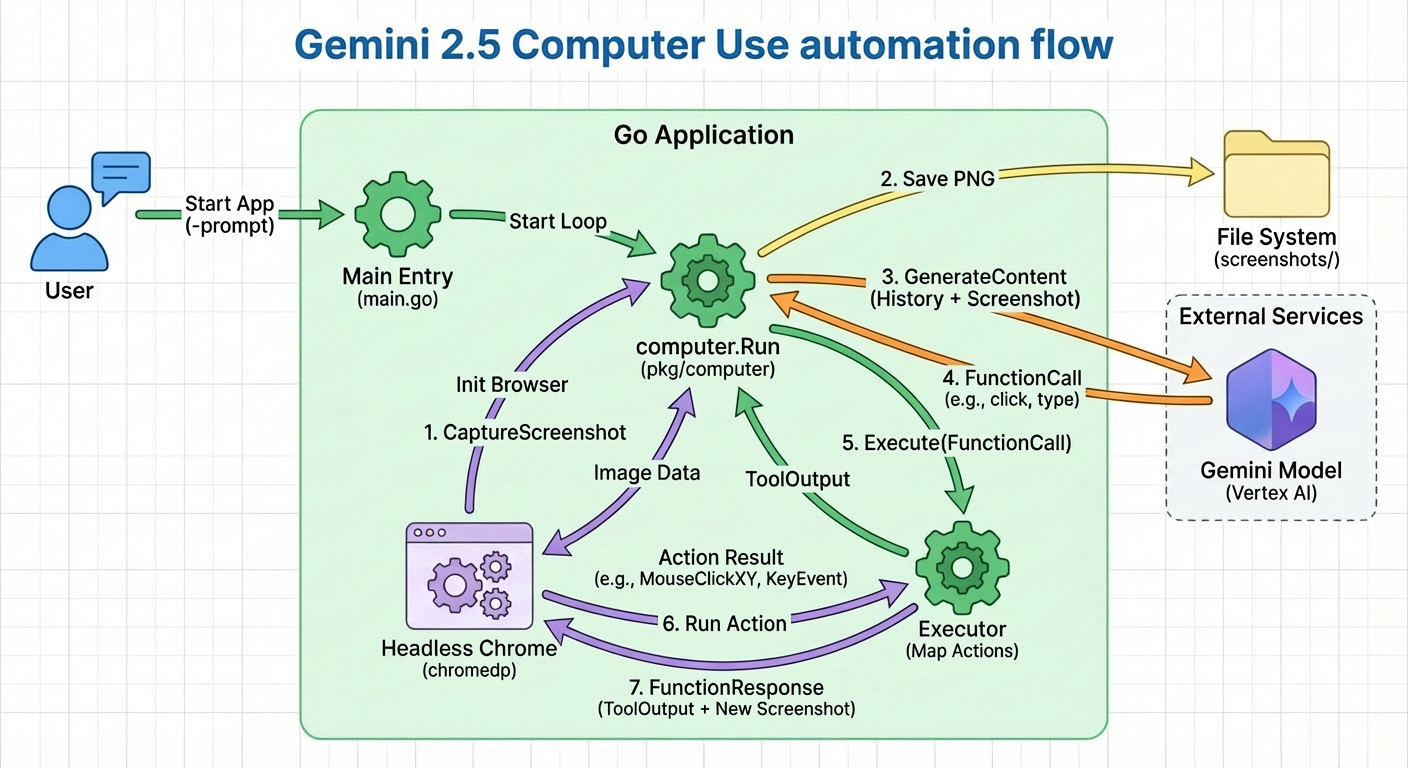
The Architecture
The agent follows a classic "Observe-Think-Act" loop:
- Observe: Take a screenshot of the current browser state using
Chromedp. - Think: Send the screenshot + current goal to Gemini 2.5. The model identifies the next UI element to interact with and the action to take (click, type, scroll).
- Act: Execute the action via
Chromedp(e.g.,chromedp.Click,chromedp.SendKeys).
Why Go?
While many AI agent frameworks are built in Python (like LangChain or Playwright-based agents), Go offers several advantages for this specific task:
- Concurrency: Handling multiple browser instances or websocket connections to Chrome is highly efficient in Go.
- Type Safety: Working with complex UI schemas and model outputs is less error-prone.
- Performance: The overhead of the "glue code" between the browser and the AI is minimal.
Key Implementation Details
Handling Dynamic Content
One of the biggest challenges in computer use is the dynamic nature of the web. Pages load at different speeds, and elements appear or disappear. We implement a "stabilization" check where we wait for the DOM to settle before capturing a screenshot for the model.
Visual Reasoning
Gemini 2.5 Flash is exceptionally good at spatial reasoning. Instead of relying solely on HTML selectors (which can be brittle), the model looks at the visual representation to determine coordinates. We then map these coordinates to the browser viewport for execution.
Example Workflow
Let's look at how the model handles a simple task like "Search for the latest Google DeepMind research":
Conclusion
Building agents that can actually do things on the web opens up a massive range of possibilities for automation—from automated testing to complex research tasks. By combining the visual intelligence of Gemini with the robustness of Go, we can create agents that are both smart and reliable.