The Go Gopher is designed by Renee French and licensed CC BY 4.0.
This guide walks through building, securing, and deploying a high-performance Model Context Protocol (MCP) server using Go and the official github.com/modelcontextprotocol/go-sdk v1.7.0.
Go is an exceptional language for production MCP servers:
- Zero Runtime Dependencies: Compiles into a single, self-contained static binary.
- Instant Boots: Decompresses and boots in under 20ms, ideal for serverless scale-from-zero platforms.
- Minimal Footprint: Consumes ~40MB of RAM under full load, making container hosting cost-effective.
🎯 The Production Challenge: Beyond Localhost
Most MCP tutorials show you how to expose a basic tool over stdio or on an unauthenticated localhost port. That works for local experimentation and personal use, but deploying an MCP server to production environments (such as Google Cloud Run, AWS ECS, or Kubernetes) surfaces three immediate challenges:
- The Serverless Cold-Start Problem: Traditional MCP servers rely on stateful, long-lived Server-Sent Events (SSE) streams. In serverless scale-from-zero setups, autoscaling and container recycling cause
404 session not founderrors and disconnect active LLM sessions. - The Open-Ingress Security Problem: Tool handlers execute real business logic, query production databases, and consume upstream APIs. Exposing them without Zero-Trust authentication invites unauthorized consumption, prompt injection replay attacks, and Server-Side Request Forgery (SSRF) sweeps.
- The Database Latency Bottleneck: Naive authorization models query a central database on every tool call, degrading sub-millisecond response expectations.
The Five Production Pillars
This guide implements a battle-tested architecture solving all three problems:
- Pillar 1: Dual-Transport Multiplexing: A single HTTP endpoint handles both legacy Server-Sent Events (SSE) streams and modern Streamable HTTP requests, serving Cursor, Claude Desktop, OpenCode, Gemini Spark, Antigravity Desktop, and the
agyCLI concurrently. - Pillar 2: Stateless Serverless Resilience: Configuring
Stateless: trueinStreamableHTTPOptionsensures every POST request is self-contained. Cold starts, instance recycling, and client reconnects never drop tool executions. - Pillar 3: Zero-Trust Dynamic Identity: Dynamic client onboarding via OAuth 2.1 (RFC 7591 DCR and Client ID Metadata Documents) combined with an SSRF-safe connection dialer.
- Pillar 4: Granular Access-Scoped Tools (Least Privilege): Tools declare specific required scopes (
tools:read,tools:write,admin:access). Generic type-safe decorators enforce authorization boundaries per tool before executing business logic. - Pillar 5: Sub-Millisecond In-Memory Execution: Ephemeral authorization codes use Firestore/Redis with native TTL during handshakes, while active tool queries validate stateless signed HMAC-SHA256 JWTs locally in memory without hitting the database.
Ingress Architecture Overview
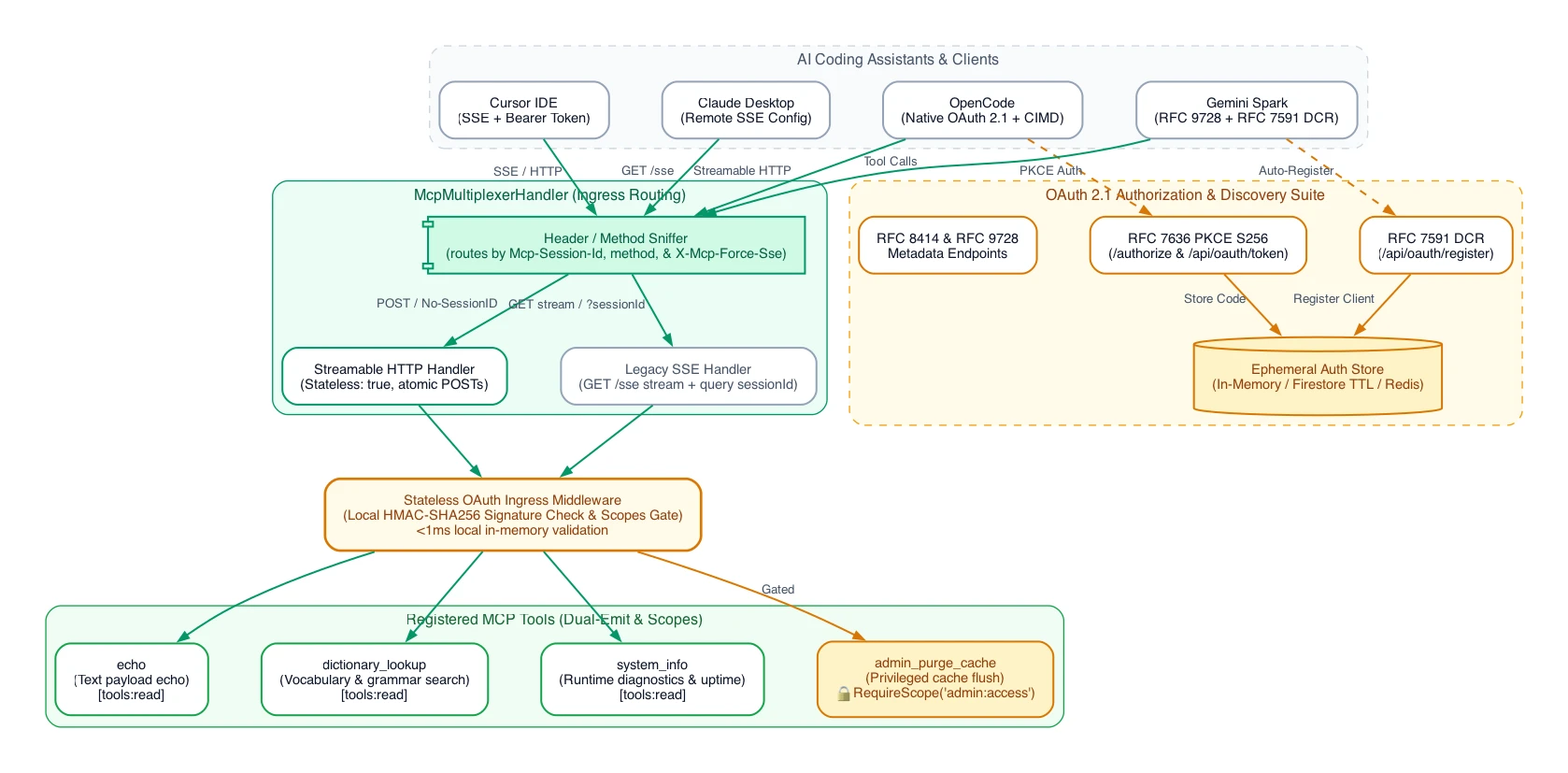
Client (Cursor / OpenCode / Claude / Spark)
       │
       ▼
┌─────────────────────────────────────────────────────────────┐
│                 McpMultiplexerHandler                       │
│  ┌─────────────────────────────┐  ┌──────────────────────┐  │
│  │    Streamable HTTP          │  │     Legacy SSE       │  │
│  │   (Stateless POSTs)         │  │   (GET Streams)      │  │
│  └──────────────┬──────────────┘  └──────────┬───────────┘  │
└─────────────────┼────────────────────────────┼──────────────┘
                  ▼                            ▼
┌─────────────────────────────────────────────────────────────┐
│              Stateless OAuth Ingress Middleware             │
│        (Local HMAC-SHA256 JWT Signature & Scopes Gate)      │
│└──────────────────────────────┬──────────────────────────────┘
                               ▼
┌─────────────────────────────────────────────────────────────┐
│                Registered MCP Tool Handlers                 │
│         (echo, dictionary_lookup, system_info)              │
└─────────────────────────────────────────────────────────────┘
📋 Table of Contents
- Prerequisites and Project Setup
- Designing Your First Tool
- Building the MCP Server
- Implementing the Multiplexer (SSE and Streamable HTTP)
- Complete Executable Server Example
- Testing Locally (Command Line and Integration Tests)
- Deploying to Google Cloud Run (Serverless Best Practices)
- Securing with OAuth 2.1 and Client ID Metadata Documents (CIMD)
- Granular Per-Tool Scopes and Access Control (Least Privilege)
- Packaging as an Agent Plugin (v1.0.0)
- Interactive Development with the Agent Skill
1. Prerequisites and Project Setup
Ensure you have Go 1.25 or higher installed.
Initialize a new Go module and add the official Model Context Protocol Go SDK:
mkdir my-mcp-server && cd my-mcp-server
go mod init github.com/username/my-mcp-server

# Install the official Go SDK
go get github.com/modelcontextprotocol/go-sdk@v1.7.0
go get github.com/golang-jwt/jwt/v4
go get github.com/google/uuid
2. Designing Your First Tool
In MCP, tools are registered with schemas defining their arguments. In Go, define your tool arguments as structured types, and the SDK automatically generates the JSON schema using jsonschema struct tags:
type DictionaryLookupArgs struct {
	Query    string `json:"query" jsonschema:"The keyword or prefix to search for (e.g., 'star', 'light')"`
	Language string `json:"language,omitempty" jsonschema:"Optional language code (e.g., 'en', 'es')"`
}
The tool handler must conform to the following signature:
func yourToolHandler(ctx context.Context, req *mcp.CallToolRequest, args YourArgsStruct) (*mcp.CallToolResult, any, error)3. Building the MCP Server
Create the server instance and register tools using type-safe helpers:
// 1. Instantiate the MCP Server with options
server := mcp.NewServer(&mcp.Implementation{
    Name:    "my-mcp-server",
    Version: "1.0.0",
}, &mcp.ServerOptions{
    Instructions: "You have access to a dictionary lookup tool. Use dictionary_lookup to find definitions.",
    KeepAlive:    30 * time.Second,
})

// 2. Register tools using the type-safe AddTool helper
mcp.AddTool(server, &mcp.Tool{
    Name:        "dictionary_lookup",
    Title:       "Dictionary Lookup",
    Description: "Search vocabulary definitions and usage notes.",
    Annotations: &mcp.ToolAnnotations{ReadOnlyHint: true},
}, dictionaryLookupHandler)
4. Implementing the Multiplexer (SSE and Streamable HTTP)
MCP defines two standard HTTP-based transport protocols:
- Server-Sent Events (SSE): Traditional transport where the client opens a persistent
GETstream and sends JSON-RPC payloads via separatePOSTrequests. - Streamable HTTP: A newer, high-performance transport tailored for direct agent tool invocations, using session headers and stateless request transports.
To support both client types seamlessly, implement a custom Multiplexer that sniffs incoming requests and routes them to the correct SDK handler.
For Streamable HTTP, configure Stateless: true in StreamableHTTPOptions:
type McpMultiplexerHandler struct {
	sseHandler        http.Handler
	streamableHandler http.Handler
}

func NewMcpMultiplexerHandler(getServer func(*http.Request) *mcp.Server) *McpMultiplexerHandler {
	return &McpMultiplexerHandler{
		sseHandler: mcp.NewSSEHandler(getServer, nil),
		streamableHandler: mcp.NewStreamableHTTPHandler(getServer, &mcp.StreamableHTTPOptions{
			Stateless: true,
		}),
	}
}

func (h *McpMultiplexerHandler) ServeHTTP(w http.ResponseWriter, r *http.Request) {
	if strings.EqualFold(r.Header.Get("X-Mcp-Force-Sse"), "true") {
		h.sseHandler.ServeHTTP(w, r)
		return
	}

	hasSessionID := false
	for k := range r.URL.Query() {
		if strings.ToLower(k) == "sessionid" {
			hasSessionID = true
			break
		}
	}

	if r.Header.Get("Mcp-Session-Id") != "" ||
		r.Method == http.MethodDelete ||
		(r.Method == http.MethodPost && !hasSessionID) {
		h.streamableHandler.ServeHTTP(w, r)
		return
	}

	h.sseHandler.ServeHTTP(w, r)
}
5. Complete Executable Server Example
A complete, runnable template is available in the github.com/ghchinoy/mcp-server-go-template repository:
main.go: Entrypoint and graceful shutdown.mcp.go: Tool handlers with dual-emit outputs.multiplexer.go: Stateless Streamable HTTP + SSE routing.auth.go: OAuth 2.1 RFC 8414, RFC 9728, RFC 7591 DCR, and SSRF dialer.
6. Testing Locally
Automated Go Integration Test
Create main_test.go to automate client handshake and tool execution testing:
func TestMcpIntegration(t *testing.T) {
	server := NewMCPServer()
	handler := NewMcpMultiplexerHandler(func(*http.Request) *mcp.Server { return server })
	ts := httptest.NewServer(handler)
	defer ts.Close()

	ctx := context.Background()
	transport := &mcp.SSEClientTransport{Endpoint: ts.URL + "/sse"}
	client := mcp.NewClient(&mcp.Implementation{Name: "test-client", Version: "1.0.0"}, nil)

	cs, err := client.Connect(ctx, transport, nil)
	if err != nil {
		t.Fatalf("Failed to establish MCP connection: %v", err)
	}
	defer cs.Close()

	res, err := cs.CallTool(ctx, &mcp.CallToolParams{
		Name:      "echo",
		Arguments: map[string]any{"message": "Hello MCP"},
	})
	if err != nil {
		t.Fatalf("Failed to invoke tool: %v", err)
	}

	text := res.Content[0].(*mcp.TextContent).Text
	if !strings.Contains(text, "Hello MCP") {
		t.Errorf("Unexpected result: %s", text)
	}
}
Run tests with:
go test -v ./...7. Deploying to Google Cloud Run
Deploying to serverless platforms requires two rules:
- Session Affinity for Legacy SSE Fallbacks: Add
--session-affinityso legacy long-lived SSE connections route back to the same container instance. - Stateless Mode for Streamable HTTP: Configuring
Stateless: trueensures atomic POST tool calls succeed even if routed across different container instances.
gcloud run deploy my-mcp-server \
    --source . \
    --region us-central1 \
    --allow-unauthenticated \
    --port 8080 \
    --memory 256Mi \
    --cpu 1 \
    --session-affinity
8. Securing with OAuth 2.1 and Client ID Metadata Documents (CIMD)
1. Ephemeral State Storage
When managing 5-minute authorization codes during user approval, choose a managed store with TTL (such as Google Cloud Firestore or Redis):
- Zero Maintenance: Native TTL policies clean up expired codes automatically.
- Isolation: Gated behind IAM credentials.
2. SSRF-Safe Dynamic Client Validation
When resolving remote Client ID Metadata Documents (client_id URL), block connections to private and loopback subnets:
func SafeHTTPClient() *http.Client {
	return &http.Client{
		Timeout: 5 * time.Second,
		Transport: &http.Transport{
			DialContext: func(ctx context.Context, network, addr string) (net.Conn, error) {
				host, port, _ := net.SplitHostPort(addr)
				ips, _ := net.DefaultResolver.LookupIP(ctx, "ip", host)
				for _, ip := range ips {
					if ip.IsLoopback() || ip.IsPrivate() || ip.IsLinkLocalUnicast() {
						return nil, fmt.Errorf("SSRF defense blocked connection to private IP: %s", ip)
					}
				}
				dialer := net.Dialer{Timeout: 3 * time.Second}
				return dialer.DialContext(ctx, network, net.JoinHostPort(ips[0].String(), port))
			},
		},
	}
}
3. Stateless Access Token Ingress Middleware
Validate signed HMAC-SHA256 JWT access tokens locally in memory without database calls during active tool execution:
func (a *AuthServer) RequireBearer(next http.Handler) http.Handler {
	return http.HandlerFunc(func(w http.ResponseWriter, r *http.Request) {
		tokenStr := extractBearerToken(r)
		token, err := jwt.Parse(tokenStr, func(token *jwt.Token) (interface{}, error) {
			return a.signingKey, nil
		})
		if err != nil || !token.Valid {
			http.Error(w, "Unauthorized: invalid or expired token", http.StatusUnauthorized)
			return
		}

		// Stash claims in request context for per-tool downstream checks
		if claims, ok := token.Claims.(jwt.MapClaims); ok {
			r = r.WithContext(ContextWithClaims(r.Context(), claims))
		}

		next.ServeHTTP(w, r)
	})
}
9. Granular Per-Tool Scopes and Access Control (Least Privilege)
Gating an entire endpoint (/sse) with a single scope assumes all tools share identical risk levels. In production, an MCP server often aggregates read-only lookups, mutating updates, and administrative operations:
| Tool | Action | Risk Level | Required Scope |
|---|---|---|---|
dictionary_lookup |
Read-only search | Low / Zero-risk | tools:read |
update_record |
Mutates data | Moderate risk | tools:write |
admin_purge_cache |
Flushes system state | High risk / Privileged | admin:access |
Because all tools are dispatched over the same multiplexed connection, gating /sse at the HTTP route level cannot prevent a client with tools:read from calling admin_purge_cache.
Type-Safe Generic Tool Decorators (RequireScope)
Using Go generics, wrap tool handlers with RequireScope[In, Out any] to enforce authorization boundaries without cluttering handler logic:
func RequireScope[In, Out any](
	requiredScope string,
	handler func(context.Context, *mcp.CallToolRequest, In) (*mcp.CallToolResult, Out, error),
) func(context.Context, *mcp.CallToolRequest, In) (*mcp.CallToolResult, Out, error) {
	return func(ctx context.Context, req *mcp.CallToolRequest, args In) (*mcp.CallToolResult, Out, error) {
		claims, ok := ClaimsFromContext(ctx)
		if !ok || !HasScope(claims, requiredScope) {
			var zeroOut Out
			return &mcp.CallToolResult{
				Content: []mcp.Content{
					&mcp.TextContent{
						Text: fmt.Sprintf(
							"Permission Denied: Caller lacks required OAuth scope %q. "+
								"Upgrade permissions at the authorization portal or request this scope from your administrator.",
							requiredScope,
						),
					},
				},
				IsError: true,
			}, zeroOut, nil
		}
		return handler(ctx, req, args)
	}
}
Tool Registration in mcp.go
// Baseline read-only tool (accessible to any authenticated client)
mcp.AddTool(server, &mcp.Tool{
	Name:        "dictionary_lookup",
	Title:       "Dictionary Lookup",
	Description: "Searches vocabulary terms.",
	Annotations: &mcp.ToolAnnotations{ReadOnlyHint: true},
}, dictionaryLookupHandler)

// Privileged administrative tool (gated by 'admin:access')
mcp.AddTool(server, &mcp.Tool{
	Name:        "admin_purge_cache",
	Title:       "Purge System Cache",
	Description: "Flushes runtime cache partitions (requires 'admin:access' scope).",
	Annotations: &mcp.ToolAnnotations{ReadOnlyHint: false},
}, RequireScope("admin:access", adminPurgeCacheHandler))
10. Packaging as an Agent Plugin (v1.0.0)
Once your Go MCP server is operational, package it as a standard Agent Plugin:
- Create
plugin.jsonin the root:{ "$schema": "https://agent-plugins.org/schemas/1.0.0/plugin.schema.json", "name": "my-mcp-plugin", "version": "1.0.0", "description": "Custom Go MCP tools and workflow skills" } - Create
mcp.jsonin the root:{ "$schema": "https://agent-plugins.org/schemas/1.0.0/mcp.schema.json", "mcpServers": { "remote-server": { "type": "streamable-http", "url": "https://my-server.run.app/sse" } } } - Bundle Agent Skills in
skills/:
Addskills/<skill-name>/SKILL.mddocuments providing instructions to AI agents on when and how to call your MCP tools. For multi-plugin authoring and linting, refer to the skills-to-plugins
toolchain.
11. Interactive Development with the Agent Skill
To build or customize your MCP server interactively without manual boilerplate drafting, open your AI coding assistant (Cursor, OpenCode, Claude Code, Gemini CLI) in this repository and prompt:
"Let's start building a production-grade MCP server using the Go template."
The bundled mcp-go-scaffolder skill (skills/mcp-go-scaffolder/SKILL.md) will guide the assistant to gather requirements, write typed argument schemas with jsonschema tags, implement dual-emit handlers, configure transport multiplexing, and write integration tests.